Team chat with an AI colleague

Talk it through.Watch it get done.

Most AI tools sit outside the work, waiting for context.
EvoOrg puts Dr. Lee in your chats, calls and meetings, so owners, deadlines and next steps come from the conversation itself.

Most AI tools sit outside the work.
EvoOrg puts Dr. Lee in your chats, so every ask gets an owner.

  1. 1

    Said in the thread

    Someone asks in chat.

    M
    Maya Chen

    Priya, can you get us three venue options with quotes by Friday?

    P
    Priya Shah

    On it.

    No form to fill in. The request stays in the conversation where it was made.

  2. 2

    Tracked as an item

    It becomes owned work.

    #2 Venue shortlistNeeds action
    Owner
    PPriya Shah
    Due
    Fri, Oct 16
    In Items and on Priya's calendar

    A request in the thread becomes an item with an owner and a due date. It shows up in the channel's Items tab, in My items and on the calendar.

  3. 3

    Noted when it's done

    Progress finds the item.

    P
    Priya Shah

    Shortlist's done. Three venues, quotes are in the doc.

    Update noted on #2 Venue shortlist

    Mention progress in passing and it's noted on the right item, so nobody has to fill in a status update.

Highlights

Built for the way teams actually work.

Chat, calls, meeting notes and mail in one place, with an AI colleague who works where your team works.

01Butler & Twin

Your own AI, working for you.

Hand Butler a task in a private conversation. When a message is waiting on you, your twin drafts the reply.

1Butler

Your own Butler, on the side.

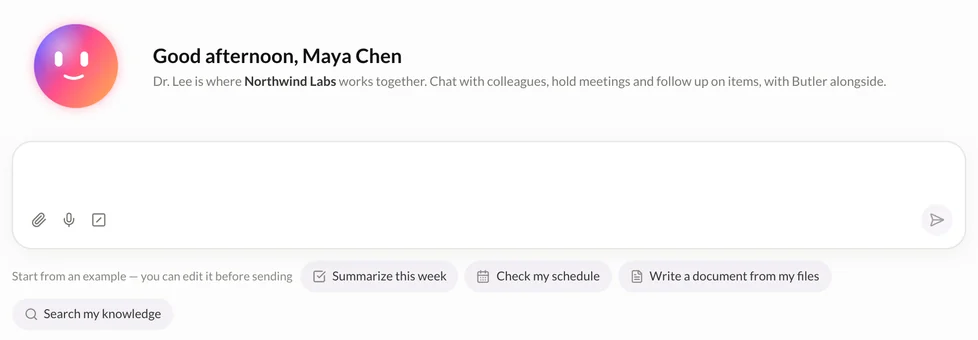
Ask Butler anything in a private conversation. It works from your personal knowledge and files, and any transcript can be opened in Butler with one click.

  • Summarize this week
  • Check my schedule
  • Write a document from my files
Butler's home: a greeting for Maya Chen, a message box and suggested prompts
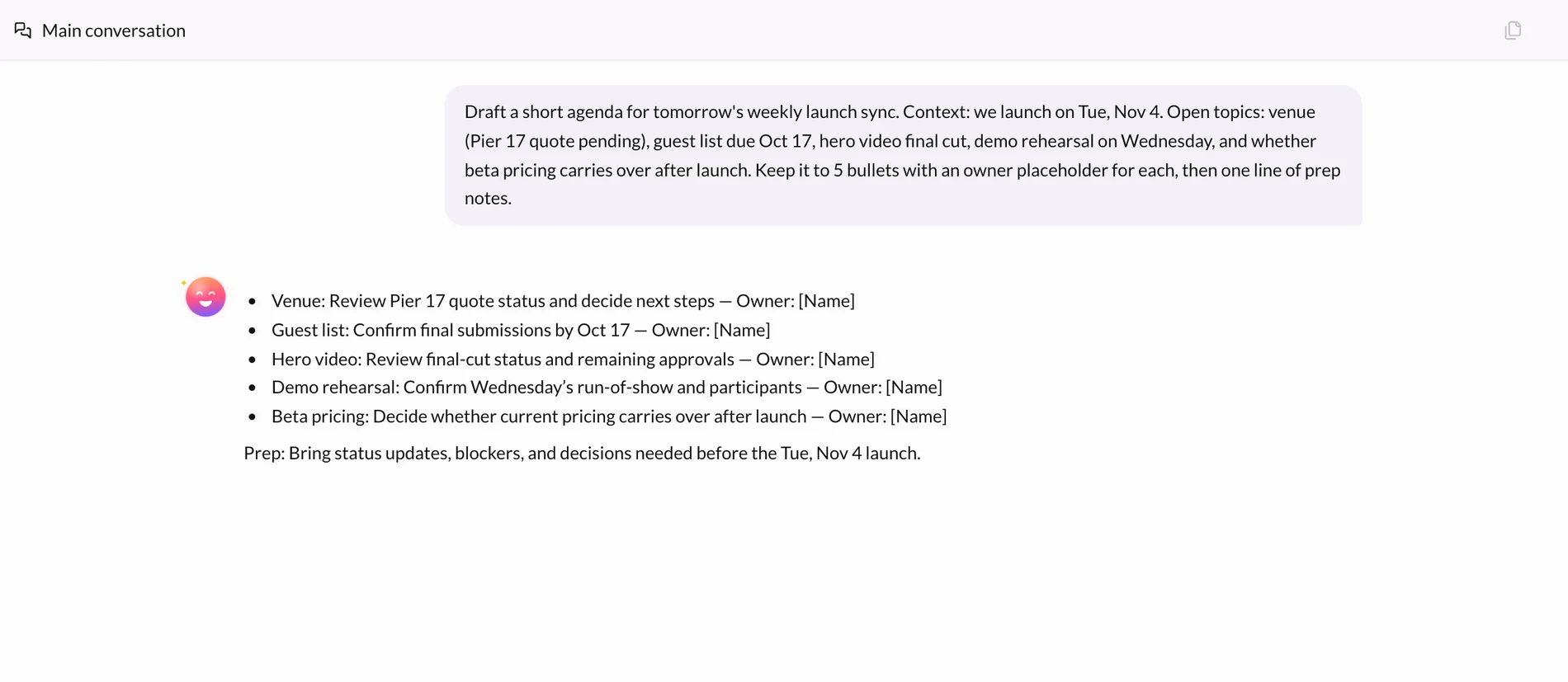
Draft a short agenda for tomorrow's launch sync
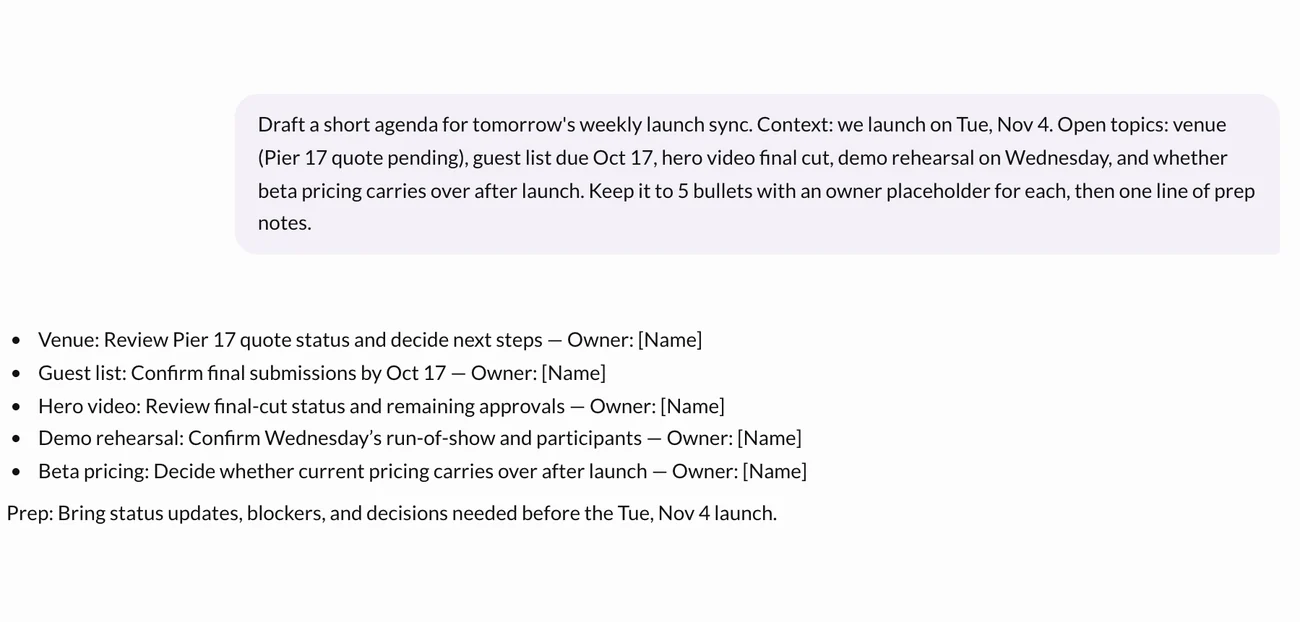
Butler drafting a five-point agenda for the weekly launch sync

2Twin

Your twin drafts. You press send.

When a message is waiting on you, your twin drafts the reply. Nothing goes out until you confirm it, and the message shows your twin drafted it.

  • Edit the draft, or dictate your own reply
  • Everyone in the conversation can see which messages your twin drafted
  • Shape it yourself: body, face, colour and accessory

A twin named Pearl: an ink-coloured dumpling wearing a red beret
L
Leo Park

Maya, can we move the design crit to Thursday?

Draft replyPrepared by Pearl

Thursday 4 PM works. I'll move the invite.

Dictate replySend reply
M
Maya ChenPearl

Thursday 4 PM works. I'll move the invite.

Drafted by Maya's twin, confirmed by Maya
02Dr. Lee

An AI colleague in every channel.

Mention @Dr. Lee and it answers in the thread. Everyone sees the same answer.

  • Draws on the team's messages, files and meeting notes
  • Answers stay in the channel, not in one person's chat
  • Turns a discussion into items when you ask
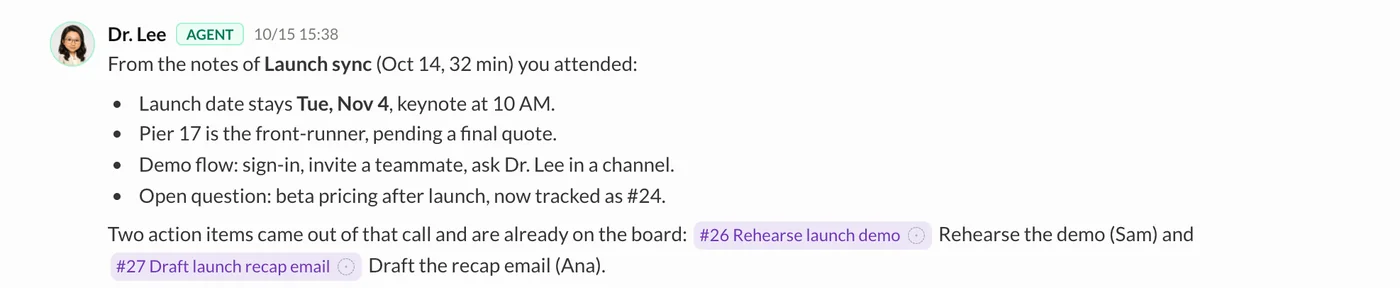
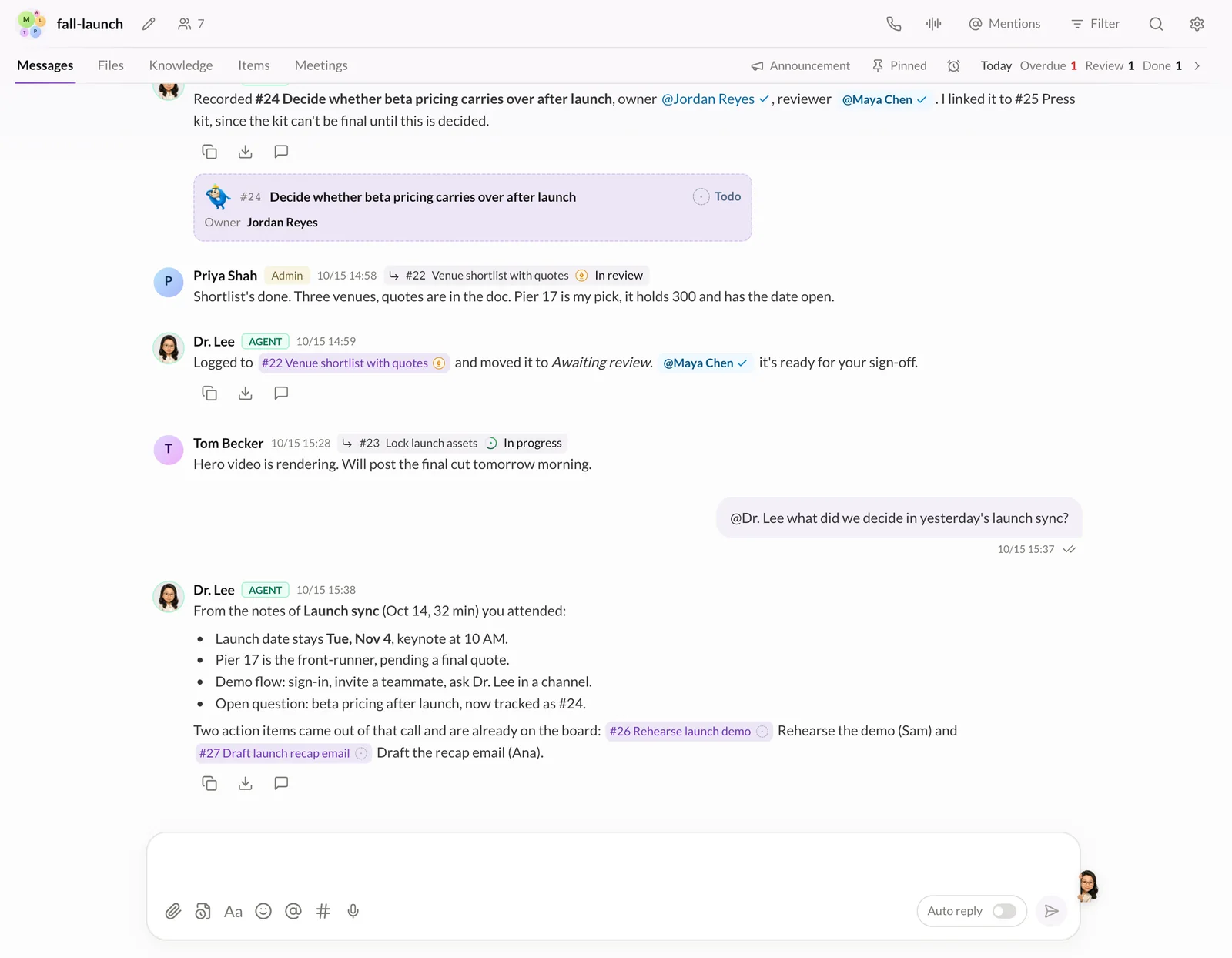
The #fall-launch channel with team messages and Dr. Lee replies
@Dr. Leewhat did the launch sync decide?
Dr. Lee replying in #fall-launch with decisions from the Launch sync meeting and two linked items

03Items

Every ask gets an owner.

Requests in chat become items with an owner and a due date. Nobody has to fill in a status update.

  • Owner and due date come from the conversation
  • In the Items tab, My items and on the calendar
  • Progress is noted when someone mentions it
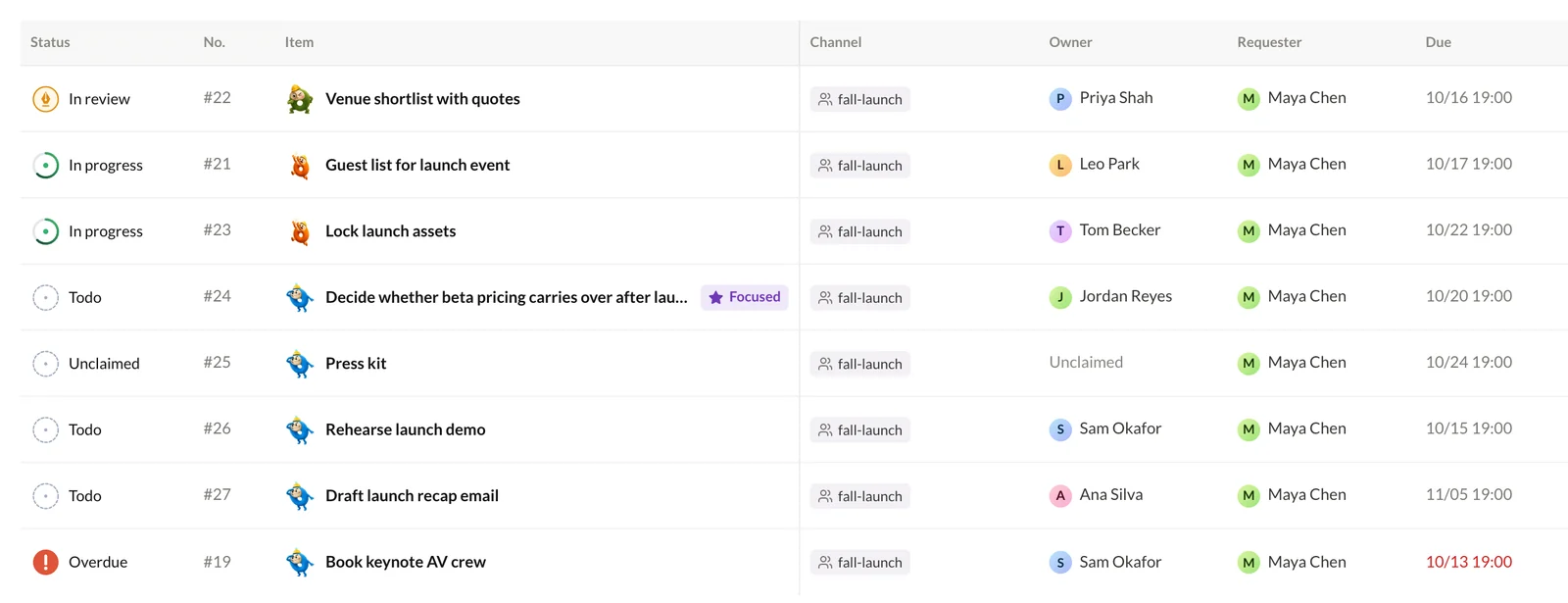
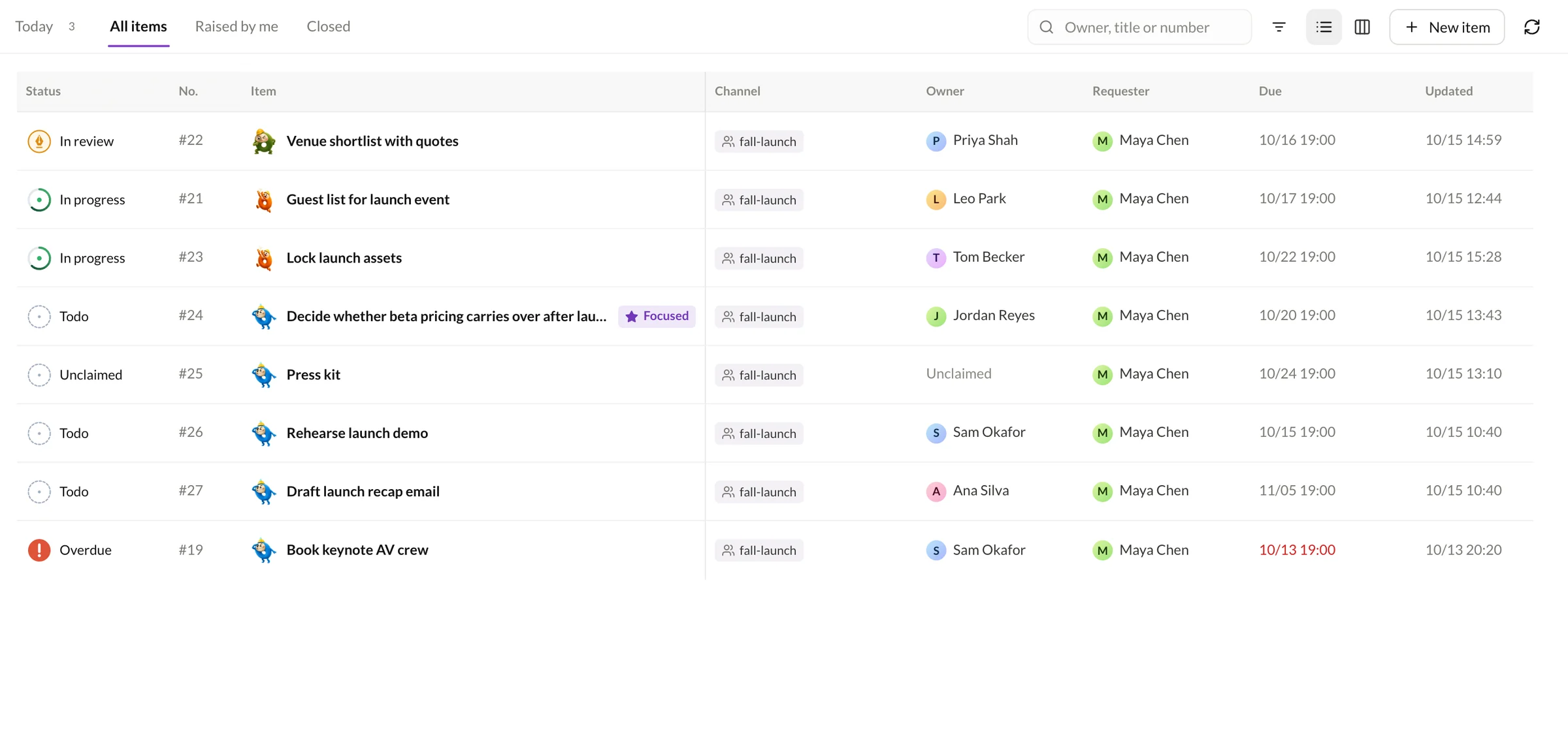
My items table: eight launch items with status, owner and requester
M
Maya Chen

Priya, can you get us three venue options with quotes by Friday?

#2 Venue shortlistNeeds actionIn progressIn review
Owner
PPriya Shah
Due
Fri, Oct 16
In Items and on Priya's calendar

04Transcribe

Meetings write themselves up.

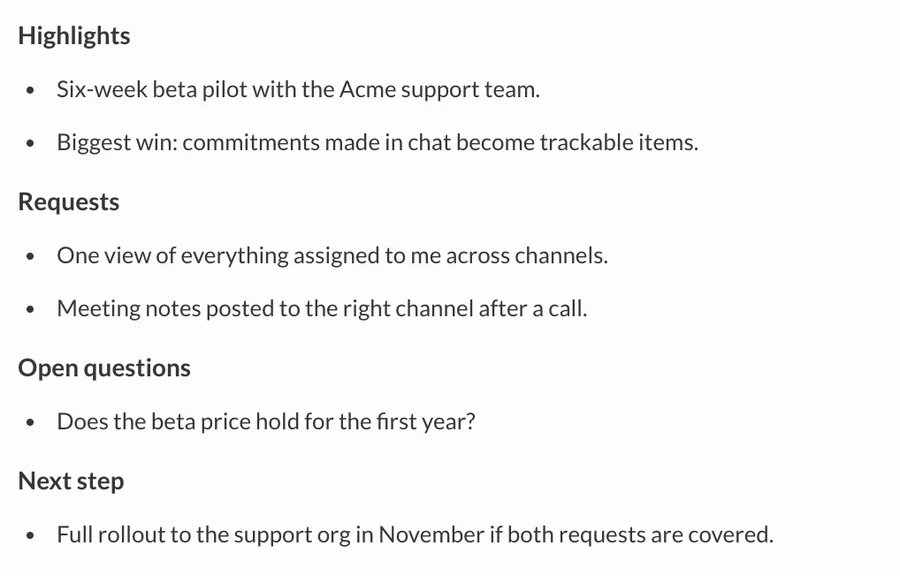
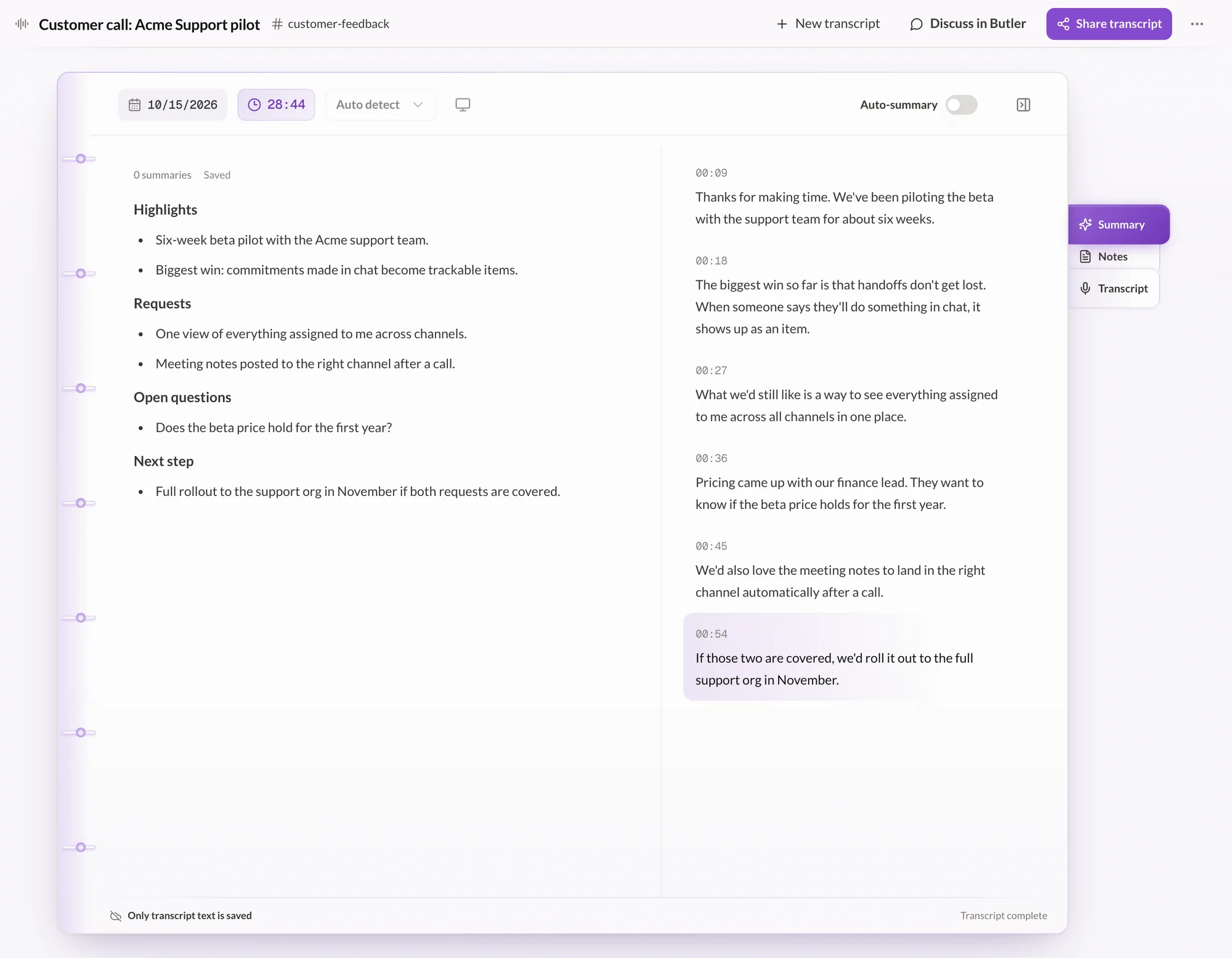
A live transcript with timestamps, including screen audio, plus an AI summary of highlights, requests, open questions and next steps. Private until you share it to a channel.

Launch sync

Maya Keynote stays at 10 AM on the 4th.

Leo Pier 17 is the front-runner, quote pending.

Priya I'll confirm the hold by Friday.

Summary shared to #fall-launch
AI summary of a customer call with highlights, requests, open questions and next step
  • Voice callsRing the people you need, from any channel.
  • MailReply desk drafts. You send.
  • CalendarCalls, events and due dates in one week.
  • RunspaceRepeatable processes with owners and reviewers.
  • WriteDrafts that read your brief and references.
  • FilesOne library, with permissions and history.

Results belong to the team.

A colleague who keeps every thread moving.

Request a demo
  1. People and Dr. Lee share one channel. Mention @Dr. Lee in plain words, and the answer, the plan and who owns what stay where the whole team can see them, next to the channel's files and knowledge.

  2. Butler is your personal AI assistant. Ask it anything in a private conversation; it works from your own knowledge and files, and keeps its files, workspace and skills next to the chat.

  3. Dr. Lee turns a discussion into items with an owner, a due date and a status. Follow them in the channel's Items tab, in My items across every channel, and on the calendar.

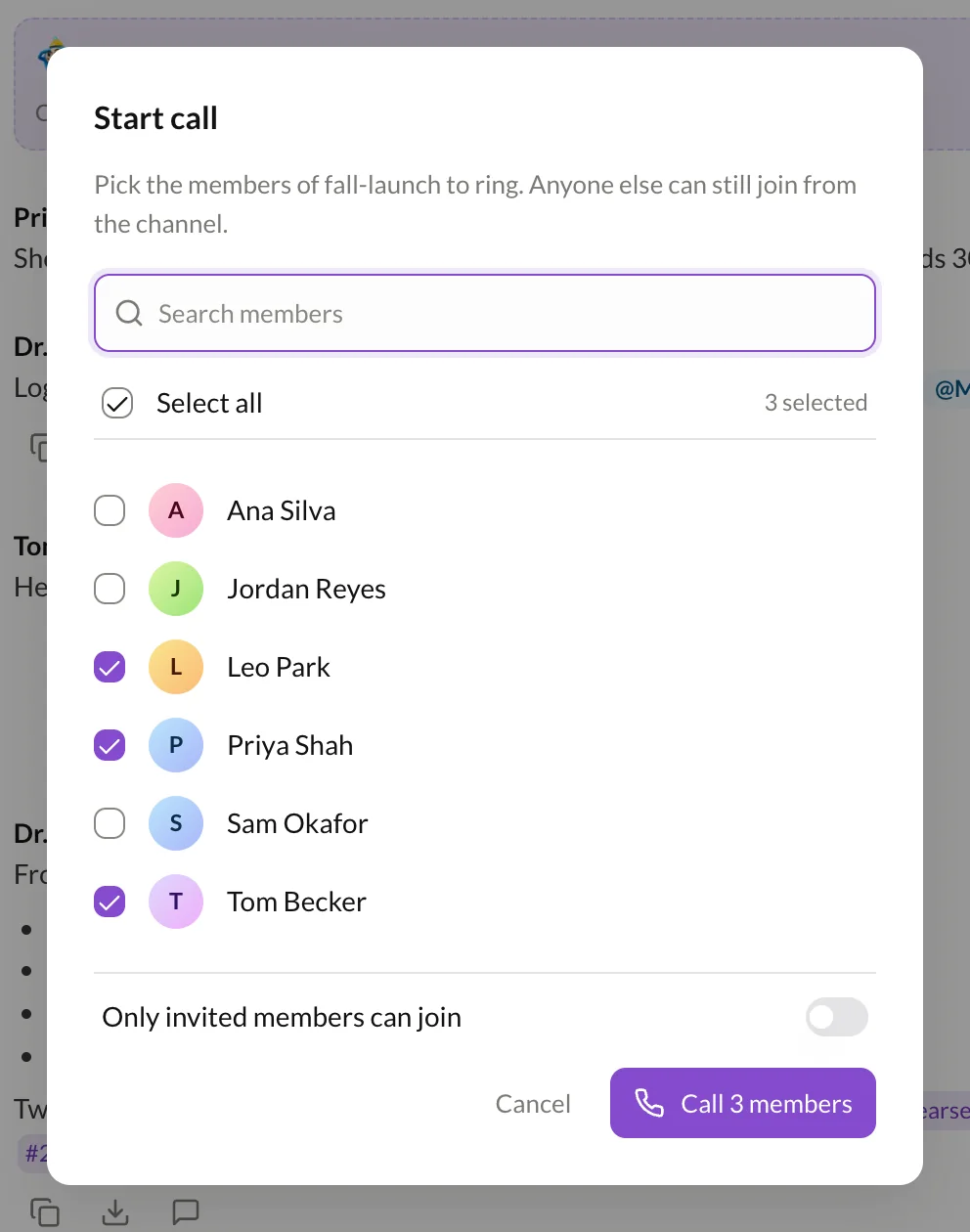
  4. Start a voice call from any channel. Ring the people you need, or leave it open so anyone in the channel can join. Calls can be transcribed, and their notes stay in the channel's Meetings tab.

  5. Transcribe a meeting live, including screen audio. You get a timestamped transcript and an AI summary, private until you share it to a channel.

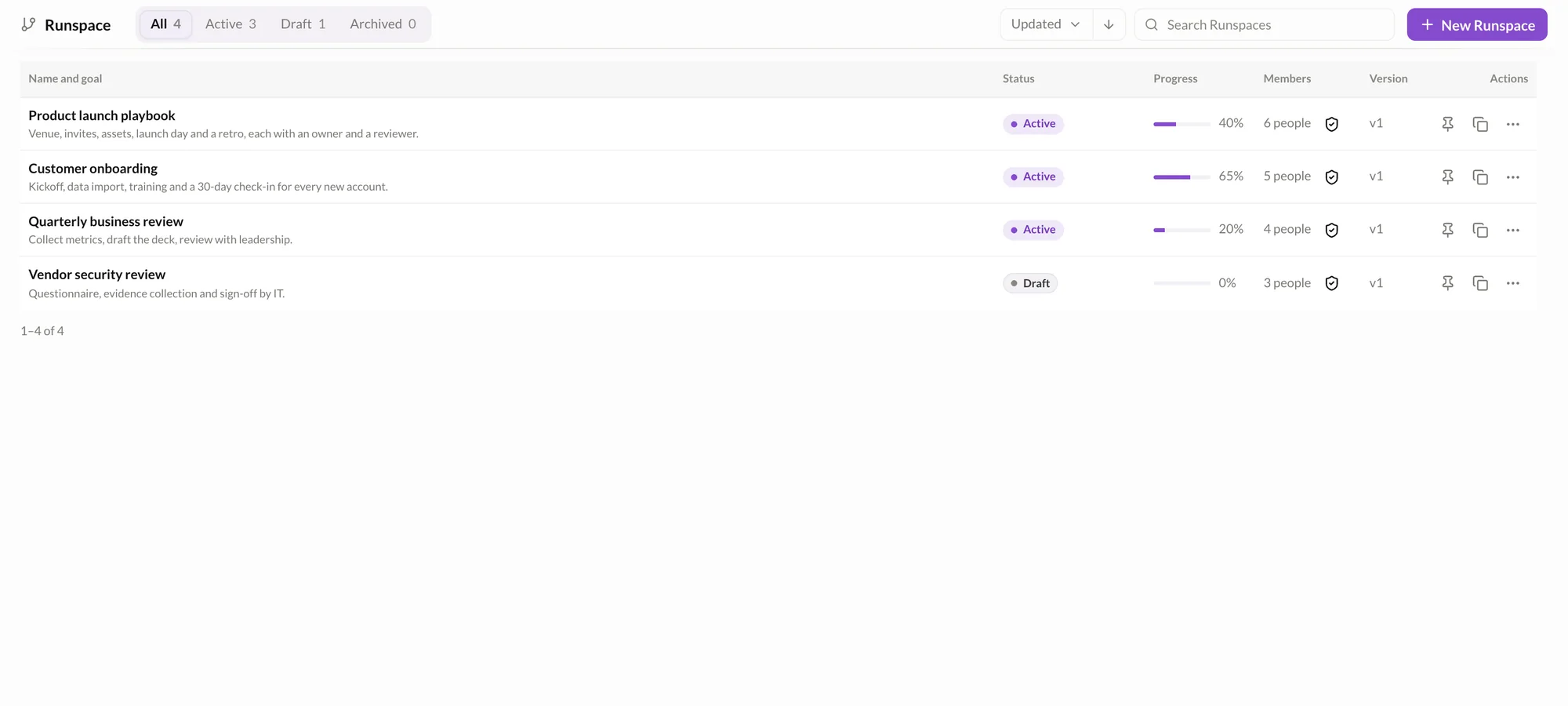
  6. Turn a process you repeat into a Runspace with steps, owners and reviewers. Track every one from a single list, from draft to active to archived.

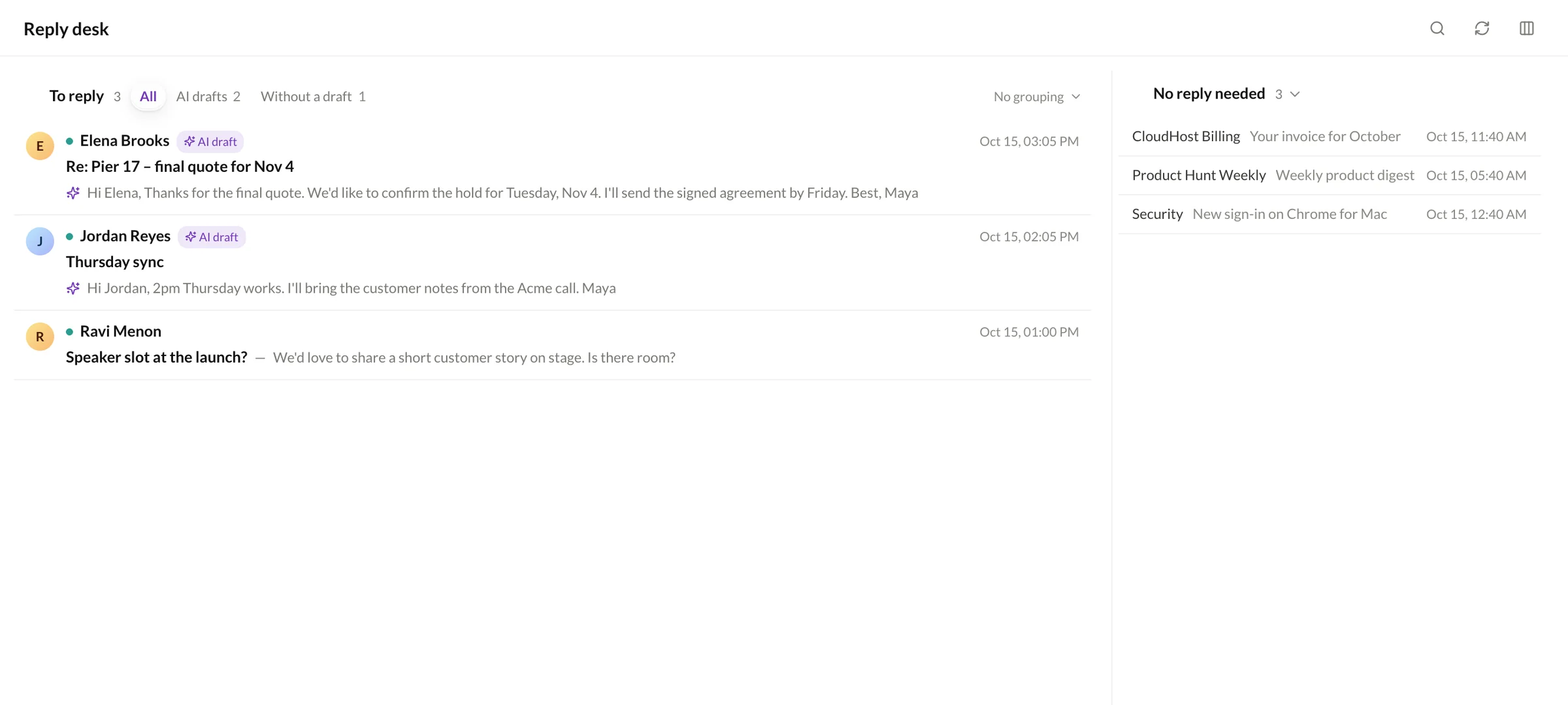
  7. Reply desk sorts your inbox into drafts to review, threads that need you, and mail you can skip. Nothing goes out until you send it yourself.

Everything around the work,
in one place.

Channels. Direct messages. Voice calls. Items. Calendar. Mail. Transcribe. Knowledge. Files. Runspace. Butler.

One shared context for the whole team,so nobody pastes it into a chatbot again.

In review#22 Venue shortlist
Transcribe · Launch sync

FAQs

Dr. Lee is the AI colleague built into EvoOrg. It works in your channels alongside the team: mention @Dr. Lee to turn a discussion into items, ask what a meeting decided, or draft a Runspace. Once items exist, progress people mention in the channel is noted on them.

No. Items come straight out of the conversation. Chat, voice calls, items, calendar, mail, transcription, knowledge and Runspace all live in EvoOrg, so Dr. Lee works from the same context as your team.

A bot usually means a separate conversation for each person, and whatever it produces belongs to whoever asked. In EvoOrg, people and Dr. Lee share one channel, and the results (items, owners, workflows) belong to the team.

People do. Delivered work waits in review until someone signs it off. In Runspace, every step has an owner and a reviewer, and Dr. Lee doesn't publish a Runspace on its own.

No. Reply desk prepares drafts for threads that need an answer. Choose Use it to move a draft into your reply, edit it if you like, and send it yourself.

Dr. Lee works in shared channels, with the whole team. Butler is your personal assistant: a private conversation that works from your own knowledge and files.

The EvoOrg interface is available in English and Simplified Chinese.

Still have questions? Talk to our team.

Request a demo

Leave your details and we'll set up a time.

About your teamOptional

Most interested in (pick any)

By submitting, you agree we may contact you.

Prefer email? Email us →

Thanks, we've got it.

Our team will be in touch soon using the details you left.